

In digital marketing and advertising, a clear and professional quotation is a powerful tool to win over clients. Whether you run an agency, sell products online, or offer freelance services, your quotation sets the tone for transparency, trust, and professionalism.
That’s where a Google quotation template comes in. Compared to outdated Word or Excel files, Google Docs and Sheets offer a smart, collaborative, and flexible way to create and send quotes that truly represent your brand. In this guide, we’ll show you how to make the most of Google’s free templates to streamline your process and impress your clients.
What Is a Quotation Template and Why Is It Important?
Definition and Purpose of a Quotation
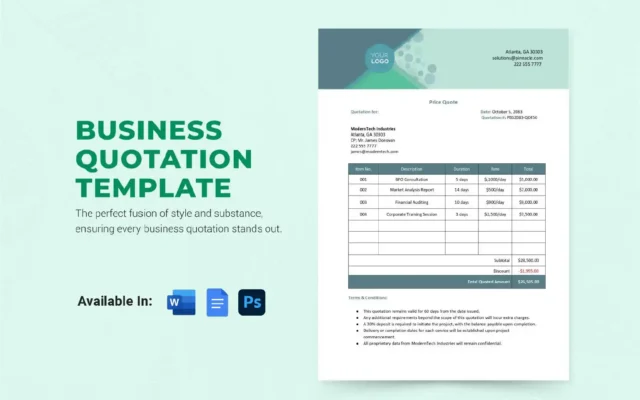
A quotation template is a document used to provide clients with a detailed estimate of the cost for products or services before work begins. In digital advertising, this might include service packages, ad spend, campaign timelines, and strategic deliverables.
It ensures both sides are aligned and helps prevent scope creep and payment issues.
The Difference Between Quotation, Invoice, and Estimate
- Quotation – A fixed-price offer sent before a sale or service agreement.
- Invoice – A billing document sent after services or goods are delivered.
- Estimate – A flexible, rough approximation, often used before finalizing a quote.
Advantages of Using a Google Quotation Template
Easy Access from Any Device
With a Google quotation template, you can create, edit, and share your quotes directly from any device with internet access. Whether you’re in a client meeting or managing campaigns on the go, you have everything at your fingertips.
Flexible Real-Time Collaboration
Google Docs allows your sales, marketing, or project management team to edit the same document simultaneously. This makes it easy to review details, update pricing, and finalize terms quickly—without the back-and-forth.
Industry-Specific Customization Options
No matter your niche—Google Ads management, influencer marketing, SEO consulting, or website design—you can easily tailor your Google quotation template with:
- Your logo and brand colors
- Service descriptions
- Pricing tables with taxes or discounts
- Terms & conditions relevant to your industry
Top 5 Free Google Quotation Templates
Here are five top-rated templates that you can access and customize in Google Docs or Sheets:
Marketing Services Quotation Template
Perfect for digital marketing agencies, this template includes fields for strategy breakdowns, campaign costs, ad management fees, and KPIs.
E-commerce Product Quotation Template
Ideal for online retailers or dropshippers, this format showcases product SKUs, unit pricing, shipping estimates, and volume discounts.
Graphic Design Quotation Template
Clean and modern, this template outlines phases of design (concept, revision, delivery), project timelines, and creative service fees.
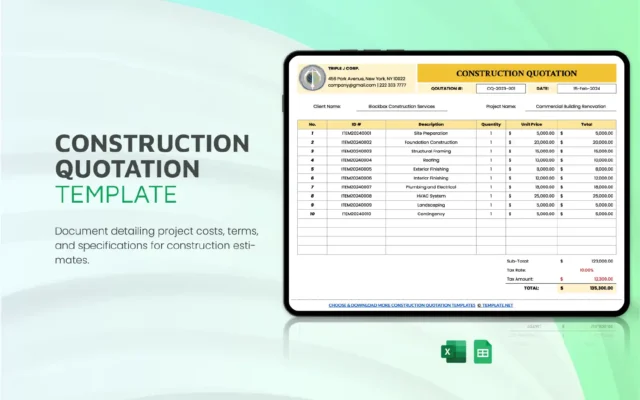
Repair & Construction Quotation Template
Use this for any on-site work or installation services. Sections include labor costs, material breakdowns, and warranty info.
Freelancer Quotation Template
This simple, elegant format helps freelancers like content creators, social media managers, or ad buyers clearly define scope and hourly/project-based fees.
How to Create a Custom Quotation Template in Google Docs
Basic Steps to Start from Scratch
- Go to Google Docs > File > New > From Template
- Choose a template or create your own blank document
- Add your company’s logo, contact info, and service list
How to Add Pricing Tables, Terms, Taxes, and Discounts
Use a table layout to include:
- Service descriptions
- Quantity or hours
- Unit price and total
- Applicable taxes or discounts
- Payment terms and expiry date
How to Save the Template for Reuse
Once complete, go to File > Make a Copy or File > Save as Template (if using a template management add-on). Store it in Google Drive for easy access and reuse.
Google Docs vs Google Sheets for Quotations
Pros and Cons of Each Platform
Google Docs
- Pros: Visually appealing, easy branding, good for presentation
- Cons: Manual calculations
Google Sheets
- Pros: Excellent for dynamic pricing and formulas
- Cons: Less visually polished
When to Use Docs vs. When to Use Sheets
Use Docs when you want your quotation to make a strong visual impact.
Use Sheets when dealing with complex pricing models or needing auto-calculation.
Recommended Tools to Automate Quotation Creation
Google Workspace + Add-ons
Combine Google quotation templates with tools like:
- Form Publisher – Turns form responses into quotes
- DocuPilot – Automates document generation
- Google Apps Script – Custom automations for tech-savvy teams
Canva, Invoice Simple, Better Proposals
- Canva: Design beautiful quotations with drag-and-drop ease
- Invoice Simple: Great for small businesses needing mobile quotes
- Better Proposals: Ideal for agencies wanting stylish, trackable proposals
Frequently Asked Questions (FAQ)
Can I add my logo and brand colors to a Google Docs template?
→ Yes, Google Docs allows full customization of fonts, images, and styles.
Is there a fee to use Google quotation templates?
→ No, most are 100% free and accessible with a Google account.
Can I send a quotation as a PDF from Google Docs?
→ Absolutely. Just go to File > Download > PDF.
Are these templates suitable for different industries?
→ Yes. Simply adjust the content and pricing details for your business type.
LLD Agency Services for Professional Quotation Templates
At LLD Agency, we understand how important it is to make a lasting first impression. That’s why we offer:
- Custom-designed Google quotation templates tailored to your brand
- Automation setup using Google Workspace tools
- Multi-language support for global client communication
- Integrated design and formatting aligned with your ad campaigns
Let our team help you streamline your quoting process and close deals faster.
Conclusion: Streamline Your Quoting Process Today
Using a Google quotation template is one of the simplest yet most effective ways to enhance your business workflow. With smart design, easy sharing, and full customization, it empowers you to send faster, clearer, and more professional proposals to your clients.
Ready to create impressive quotations that win busin



