
Understanding Google Ads Invoice and Its Importance
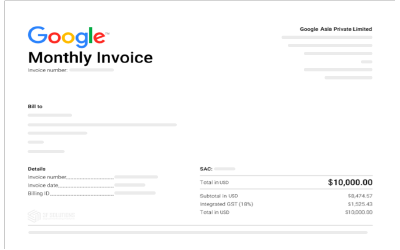
Google Ads invoice is an official billing document that provides details on advertising expenses incurred within a specified period. It serves as a critical record for businesses and individuals managing advertising budgets, ensuring transparency and accurate financial reporting.
For advertisers, properly managing Google Ads invoices helps avoid budget overruns, facilitates smooth financial audits, and ensures compliance with taxation and accounting requirements.
How to Find and Check Google Ads Invoice
Accessing Invoices in Your Google Ads Account
To locate and review your Google Ads invoice, follow these steps:
- Log in to your Google Ads account.
- Click on the Tools and Settings menu.
- Under Billing, select Billing Summary.
- Navigate to the Transactions tab.
- Choose the relevant billing cycle to view invoice details.
Checking Outstanding Invoice Balance
To verify any outstanding balance on your Google Ads invoice:
- Access the Billing Summary section.
- Look under Payment Overview to check the unpaid amount.
- If payment is required, proceed with one of the available payment methods.
How to Download Google Ads Invoice
Steps to Download an Invoice as a PDF
To download your Google Ads invoice:
- Go to the Billing & Payments section in your Google Ads account.
- Select Transactions and choose the relevant invoice.
- Click the Download button to save it in PDF format.
- Ensure the file is properly named for easy reference.
Best Practices for Storing Google Ads Invoices
- Maintain a dedicated folder for invoices to track advertising costs.
- Back up invoices in cloud storage for easy retrieval.
- Keep a monthly record to monitor ad spend trends.
Payment Methods for Google Ads Invoice
Paying via Credit or Debit Card
- Navigate to Billing & Payments in your Google Ads account.
- Select Payment Methods and click Add Payment Method.
- Enter your credit or debit card details.
- Confirm the payment to settle your invoice instantly.
Paying via Bank Transfer
- Obtain Google Ads’ bank details from the Billing & Payments section.
- Initiate a wire transfer through your bank.
- Include your Google Ads Customer ID in the payment reference.
- Payments typically reflect within 3–5 business days.
Troubleshooting Google Ads Invoice Issues
Invoice Not Displaying: Causes and Solutions
If your Google Ads invoice is missing:
- Ensure the billing cycle has ended and invoices are generated (typically within 24 hours of the month’s end).
- Check account settings to confirm the correct billing profile is selected.
- If unresolved, contact Google Ads Support.
Payment Failure: What to Do?
- Verify your payment method details are correct and funds are available.
- If using a bank transfer, confirm that the reference number was included.
- Contact Google Ads Support if the issue persists.
Tips for Managing Google Ads Costs Effectively
To prevent unexpected billing issues, implement the following cost management strategies:
- Set a daily budget limit to control ad spend.
- Regularly review Google Ads cost management reports to optimize expenses.
- Use automated rules to pause campaigns if costs exceed a predefined threshold.
FAQ Section
Can I Download Multiple Google Ads Invoices at Once?
Yes, Google Ads allows bulk invoice downloads through the Billing & Payments dashboard.
How Do I Check If My Google Ads Invoice Has Been Paid?
Go to Billing Transactions, where the payment status (Paid/Unpaid) is displayed.
Does Google Ads Send Invoices via Email?
Google Ads does not automatically send invoices via email, but users can enable billing notifications in their account settings.
What Should I Do If My Google Ads Invoice Has Incorrect Charges?
Contact Google Ads Support with invoice details and evidence of discrepancies to request corrections.
Conclusion
Managing Google Ads invoices efficiently is essential for businesses that rely on digital advertising. By understanding how to access, download, and pay invoices, advertisers can ensure seamless ad operations while keeping finances in check.
For those looking for reliable Google Ads invoice accounts, our agency provides high-quality, pre-approved accounts with flexible billing solutions. Contact us today to streamline your advertising efforts!




