
Managing multiple Google Ads accounts can be time-consuming and inefficient—especially for agencies, freelancers, or large marketing teams. That’s where the Google Ads Manager Account comes into play. Formerly known as My Client Center (MCC), this tool allows advertisers to manage several Google Ads accounts from one central dashboard.
Whether you’re running multiple campaigns for different brands or handling clients’ accounts, having a Google Ads Manager Account is the key to streamlined operations and smarter advertising decisions. In this guide, we’ll walk you through everything you need to know—from setup to best practices, including how to acquire a reliable account from our agency if needed.
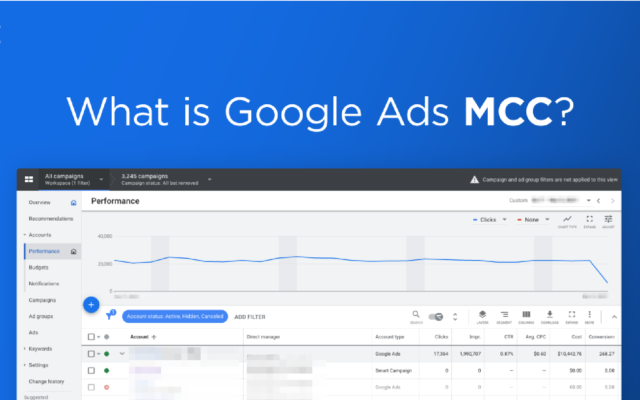
What Is a Google Ads Manager Account?
A Google Ads Manager Account is a powerful tool provided by Google that enables users to link and manage multiple individual Google Ads accounts in one interface.
Why Is It Important?
- It simplifies large-scale account management.
- Ideal for digital agencies, advertisers, and freelancers.
- Offers a holistic view of all campaigns.
- Enables centralized billing, access control, and performance monitoring.
Using a Google Ads Manager Account is essential when you’re handling multiple ad accounts. Instead of logging into each account separately, you can access all of them under one roof—saving time, improving visibility, and reducing errors.
How to Create and Set Up a Google Ads Manager Account
Before creating your Google Ads Manager Account, ensure you meet the basic requirements:
Requirements:
- A Google account (Gmail or Workspace)
- You should not already be using that account to run active Google Ads campaigns
- A clear structure of the client accounts you intend to manage
Step-by-Step Setup:
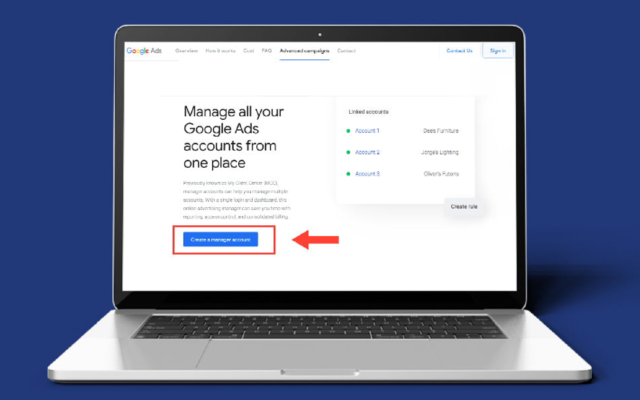
- Go to Google Ads Manager Account Sign-Up Page
- Click “Create a Manager Account”
- Enter your account name and select your time zone and currency
- Submit the form and verify your email
Congratulations! You now have a Google Ads Manager Account.
How to Link Existing Google Ads Accounts:
- From your manager account dashboard, click on “Accounts”
- Choose “+” then “Link existing account”
- Enter the Customer ID (CID) of the account you want to manage
- Send the invitation
- Ask the account owner to accept the link request
After confirmation, the linked account becomes a managed account under your dashboard.
Managing Ad Campaigns Using a Google Ads Manager Account
Organizing Sub-Accounts:
Segment your accounts based on:
- Clients
- Brands
- Campaign goals
- Geographical regions
This organization improves reporting clarity and simplifies management.
Setting Access Levels and Permissions:
As your team grows, managing who has access to what becomes critical.
- Admin access: Full control, including billing and user management.
- Standard access: Can manage campaigns but not billing or user settings.
- Read-only access: Great for external consultants or partners.
Performance Monitoring and Reporting:
With a Google Ads Manager Account, you can:
- Run comparative performance reports across accounts
- Schedule automated reporting
- Monitor KPIs like CTR, CPC, impressions, and conversions in one dashboard
This centralized view is invaluable for agencies or advertisers scaling their campaigns globally.
Pro Tips and Best Practices for Effective Management
Use Built-In Tools and Automation:
- Google Ads Editor: Make bulk changes offline and push updates instantly.
- Rules & Scripts: Automate common tasks like pausing low-performing ads or adjusting budgets.
Optimize Workflow:
- Set up labels to categorize campaigns
- Use account-level filters to quickly find underperforming campaigns
- Group similar clients under sub-manager accounts for scalability
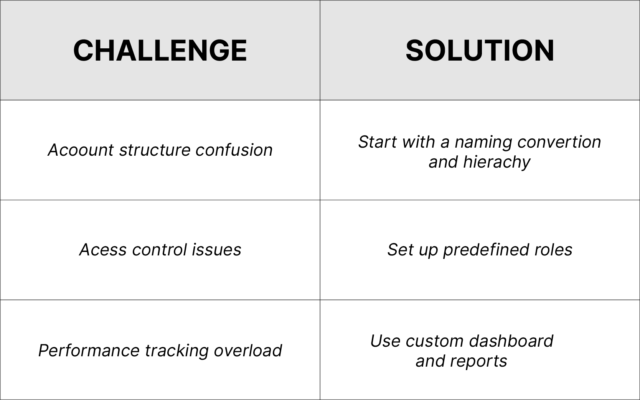
Common Challenges & How to Overcome Them:
Frequently Asked Questions (FAQ)
Is a Google Ads Manager Account free?
Yes, it’s completely free to create and use a Google Ads Manager Account.
How many accounts can I link to one manager account?
There is no hard limit, but best practices suggest managing a reasonable number to maintain effectiveness.
How can I unlink a sub-account?
Go to the Manager Account settings > Sub-account list > Select the account > Click “Unlink.”
Can the Manager Account view sub-account billing information?
Yes, but only if permission is granted by the sub-account. Otherwise, you’ll need to request billing access separately.
Conclusion
A Google Ads Manager Account is a must-have for anyone overseeing multiple campaigns or accounts. It simplifies processes, boosts productivity, and centralizes control—making your Google Ads strategy smarter and more scalable.
If you’re looking to buy a verified Google Ads Manager Account, our agency offers reliable account sourcing tailored to your needs. With flexible payment options, expert support, and international account availability (US, UK, AR, etc.), we ensure you’re equipped to start managing ads without delays or complications.
Ready to streamline your Google Ads management? Contact our team today and let us help you get started with the right account.




