
Running online ads without direction can be costly. That’s why learning how to set up Google Ads account the right way is crucial to building successful, results-driven campaigns. Whether you’re an entrepreneur, marketer, or agency, this guide will walk you through everything from preparation to launching your first campaign — even if you’re completely new.
If you’re looking for a fast and reliable start, our agency provides high-quality, verified Google Ads accounts — ready to go, with flexible limits and full support. Let’s dive in and make your first campaign a success.
Why Google Ads Matters in Digital Marketing
Google Ads is one of the most powerful tools available to businesses that want to reach potential customers with high intent. When someone searches on Google, they’re already looking for something — and that’s your chance to show up first.
Top benefits of using Google Ads:
- Appear on top of Google search results
- Target the right audience by location, interest, and behavior
- Start with any budget and scale as needed
- Track every click, impression, and conversion in real time
But to unlock those benefits, you must first set up Google Ads account properly.
What to Prepare Before You Set Up Google Ads Account
Before we go through the steps, make sure you have the essentials ready:
1. A Google Account
You’ll need a Gmail or Google Workspace account to begin.
2. Your Business Website
While optional, a website helps direct traffic, capture leads, and optimize ad relevance.
3. Billing Details
Have your credit/debit card or business payment method ready for account setup and ad spend.
Step-by-Step: How to Set Up Google Ads Account
Setting up your Google Ads account doesn’t require technical knowledge — just careful steps. Follow this structure to get started the right way.
1. Go to the Google Ads Homepage
Visit https://ads.google.com and click “Start now.”
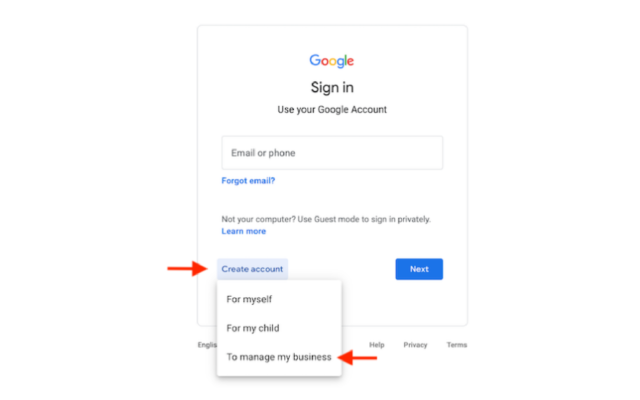
2. Log In with Google
Use your chosen Google account to log in. For businesses managing multiple projects, a dedicated account for ads is recommended.
3. Choose a Campaign Goal
Google Ads will ask you to select a goal:
- Get more website sales or signups
- Receive phone calls
- Drive visits to your physical location
- Or, click “Switch to Expert Mode” to take full control
Choose the one that suits your business — or go with Expert Mode if you’re planning a more complex setup.
4. Add Business Details
Input the following:
- Business Name
- Website URL
- Country, Time Zone, and Currency
These settings can’t be changed later, so double-check everything before saving.
5. Create Your First Campaign
Now, begin your first ad campaign:
- Choose a campaign type: Search, Display, Video, or Performance Max
- Set a daily budget
- Pick a bidding strategy (Manual CPC, Maximize Conversions, etc.)
- Name your campaign for easy tracking
This is one of the most important steps when you set up Google Ads account, as it determines how your ads will be delivered and how your budget is spent.
6. Define Your Target Audience
Target your ads by:
- Geographic Location: Choose country, region, or custom radius
- Languages: Select the languages your customers speak
- Demographics: Set filters for age, gender, household income (optional)
7. Create Ad Groups and Add Keywords
Ad groups help organize your campaign around different themes or products.
- Use Google Keyword Planner to find relevant keywords
- Group them by topic
- Add 10–20 focused keywords per ad group
A strategic keyword setup is key to getting results once you set up Google Ads account.
8. Write Your Ads
Your ad copy should include:
- Eye-catching headlines
- Relevant, benefit-driven descriptions
- A strong call to action (“Buy now”, “Get a quote”, etc.)
- The main keyword, like set up Google Ads account, naturally integrated
The more relevant and engaging your ads, the higher your Quality Score and click-through rate.
9. Set Up Your Billing
Finalize the process by adding your payment method:
- Credit or debit card
- Bank transfer (varies by country)
- Monthly invoicing (for eligible businesses)
After setting up billing, your ads are ready to go live — and congratulations, you’ve just completed the process to set up Google Ads account.
What to Do After You Set Up Google Ads Account
Launching your campaign is just the beginning. To maximize results, here are essential next steps:
1. Install Conversion Tracking
Use Google Tag Manager or place conversion codes on your website to track purchases, sign-ups, and calls. This data helps optimize future campaigns.
2. Optimize Your Landing Page
Make sure the landing page your ads point to:
- Loads fast
- Matches the ad content
- Works on mobile
- Includes a call-to-action
This impacts user experience and Quality Score.
3. Monitor & Adjust Campaigns
Use your dashboard to monitor:
- Clicks and impressions
- Cost per click (CPC)
- Conversion rate
- Ad Quality Score
Based on data, pause underperforming ads, adjust bids, or A/B test different headlines. When you properly set up Google Ads account, the ongoing optimization process becomes smoother.
Summary
Setting up your Google Ads account is not just a formality — it’s the foundation of a successful advertising strategy. When you take the time to correctly set up Google Ads account, you save money, target the right audience, and generate higher returns.
If you’re looking for a ready-made solution to save time and start running ads immediately, our agency offers Google Ads accounts with verified billing, flexible budgets, and responsive support. We help clients from all over the world advertise effectively — whether you’re scaling a dropshipping store, launching a product, or running lead generation campaigns.
Contact us today to get a premium Google Ads account set up in minutes — so you can focus on growth, not setup.
FAQs
1. Can I change billing info after I set up Google Ads account?
Yes. Go to your account settings and update payment methods or details at any time.
2. How do I pause or cancel campaigns?
Visit the “Campaigns” tab, click on the campaign you want to manage, and change its status to “Paused” or remove it entirely.
3. Does Google Ads offer support for new users?
Yes. Google Ads provides Help Center articles, tutorials, and customer support for beginners.
4. Can I run multiple campaigns under one account?
Absolutely. Once you set up Google Ads account, you can manage multiple campaigns targeting different goals or audiences.




