
Why Google Ads Is Crucial for Businesses Today
In today’s digital-first landscape, online visibility is everything. Whether you’re a small startup or a growing enterprise, running effective ads on Google can significantly boost brand awareness, drive targeted traffic, and increase conversions.
One of the most important steps in starting your journey with Google advertising is to set up the right type of account—specifically, a Google Ads business account. In this article, you’ll discover what it is, how to create one, how to manage multiple campaigns efficiently, and why many successful companies prefer using Google Ads Manager Accounts (MCC).
If you’re a business looking to start or scale Google Ads campaigns, setting up a business account is your foundation for long-term advertising success.
What Is a Google Ads Business Account?
A Google Ads business account is tailored for companies and organizations aiming to run, manage, and scale online advertising campaigns professionally. Unlike personal accounts, business accounts come with more advanced control options, including user access management, invoicing, and campaign scaling across multiple markets.
Key Differences from Personal Accounts:
- Designed for organizations instead of individuals
- Offers multi-user access and permission control
- Integrates with Google Ads Manager Accounts (MCC)
- Better suited for managing larger budgets and multiple campaigns
Benefits of Using a Google Ads Business Account
- Centralized campaign control
- Access to professional billing methods like monthly invoicing
- Ability to run ads across multiple locations and accounts
- Easier collaboration with teams and marketing agencies
What Is a Google Ads Manager Account (MCC)?
A Google Ads Manager Account—also known as an MCC (My Client Center)—is a powerful tool for advertisers who manage multiple Google Ads accounts. Whether you’re an agency, a freelancer, or a large business with multiple departments, MCC makes it simple to oversee all accounts from a single dashboard.
Benefits of Using an MCC:
- Unified view of all advertising accounts
- Seamless reporting and performance tracking
- Centralized billing management
- Assign different roles to team members
- Save time switching between accounts
Who Should Use an MCC?
- Digital marketing agencies
- Businesses running ads for multiple products or regions
- Freelancers managing multiple client campaigns
- Internal teams overseeing multiple departments
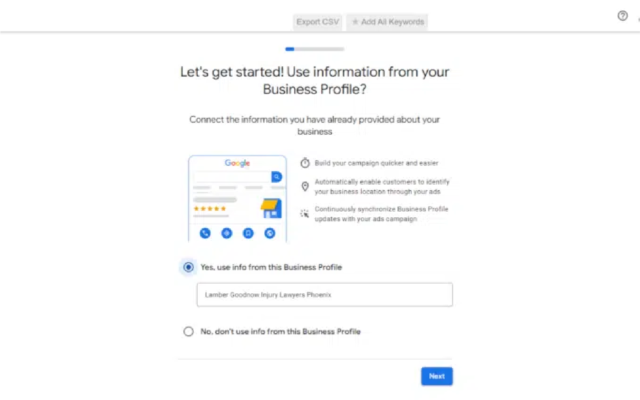
Step-by-Step: How to Create a Google Ads Business Account
Step 1: Sign in to Google Ads
Visit ads.google.com and log in with a Google Workspace account or your business email.
Step 2: Enter Business Information
Fill in details such as your business name, website, and contact details. Ensure accuracy as this will affect billing and ad visibility.
Step 3: Set Campaign Goals and Budgets
Select your primary advertising goal (sales, leads, website traffic) and choose a daily or monthly budget. Google will provide suggested amounts based on your industry.
Step 4: Add Payment Information
Choose your billing method—credit card, direct debit, or monthly invoicing if eligible. For larger businesses, monthly invoicing simplifies accounting and cash flow.
How to Create a Google Ads Manager Account (MCC)
Step 1: Go to the MCC Setup Page
Navigate to Google Ads Manager Account and click “Create a manager account.”
Step 2: Name the Account and Select Use Case
Provide a name that reflects your business or agency and choose whether you manage accounts on behalf of clients or for your own use.
Step 3: Set Time Zone and Currency
This cannot be changed later, so make sure it aligns with your billing and operational regions.
Step 4: Complete Setup
After final confirmation, you can start linking individual accounts or inviting clients to your MCC.
How to Link and Manage Multiple Google Ads Accounts
Linking Sub-Accounts to Your MCC
- Go to your MCC dashboard
- Click “+” to link existing accounts or invite new ones
- Enter the customer ID (CID) of the account you want to link
Grant Access to Team Members
- Navigate to the “Access and Security” tab
- Add users and assign roles: Admin, Standard, or Read-only
- Control who can manage campaigns, view reports, or adjust billing
Manage Budget and Track Reports
- Use MCC’s “Account Performance” view to see ad spend, clicks, and conversions
- Set up automated rules to pause underperforming campaigns
- Generate unified reports for monthly or quarterly review
Best Practices When Using a Google Ads Business Account
Follow Google’s Advertising Policies
Violating policies may lead to account suspensions. Ensure compliance with restricted content rules, accurate ad copy, and proper landing page experience.
Secure Your Account Access
Enable 2-step verification, assign appropriate roles, and regularly audit user access.
Monitor and Optimize Regularly
Use Google Analytics and conversion tracking to measure effectiveness. Run A/B tests and update ad creatives based on data.
Conclusion
A Google Ads business account, when combined with a Manager Account, provides unmatched flexibility and control for advertisers. From centralized management to simplified billing and scalable campaign operations, it’s the go-to solution for businesses serious about advertising on Google.
If you’re ready to grow your business through smart digital advertising, setting up a Google Ads business account is your first step toward success.
Need help?
At LLD Agency, we specialize in providing Google Ads business accounts and manager accounts tailored for agencies, freelancers, and global businesses. Whether you’re launching your first campaign or scaling to multiple markets, our team offers end-to-end setup and ongoing support.
Start your journey with a reliable ad account today—contact us for expert guidance.
Frequently Asked Questions (FAQ)
1. What’s the difference between a Google Ads business account and a personal account?
A business account is designed for companies, offering team access, centralized billing, and better campaign control. It supports Manager Account integration and large-scale operations.
2. How many sub-accounts can I manage under an MCC?
MCC accounts can manage hundreds of sub-accounts, depending on performance history and Google’s internal limits. It’s scalable for agencies and large enterprises.
3. Do I have to pay to create an MCC account?
No, creating a Google Ads Manager Account is completely free. Charges only apply when linked accounts run ads.
4. Can I convert a personal account into a business account?
There’s no direct conversion option. You should either create a new business account or link the personal account to a Manager Account for business use.




