
Introduction to Google Ads Receipts
In the world of digital advertising, keeping track of your financial transactions is just as critical as optimizing your campaigns. Whether you’re a small business owner or managing multiple client accounts, understanding Google Ads receipts is key to maintaining accurate records and ensuring seamless accounting.
Google Ads issues various billing documents, including invoices, receipts, and statements. Knowing how to access and interpret these documents helps you stay on top of your ad spend, comply with tax regulations, and streamline your business operations.
Here’s a breakdown of the main types of billing documents you’ll encounter:
- Invoices: Issued when a charge occurs on your account.
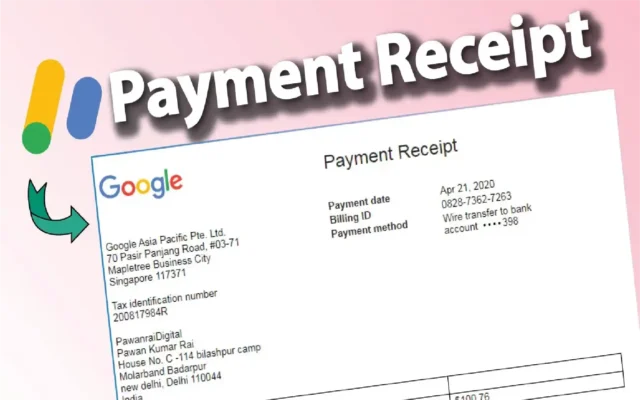
- Receipts: Proof of payment after a successful transaction.
- Account statements: Monthly summaries of all billing activities.
Properly managing your Google Ads receipts ensures that your financial reports are complete and audit-ready.
How to Access and Download Google Ads Receipts
Managing your Google Ads billing information doesn’t have to be complicated. Here’s a step-by-step guide to help you access and download your Google Ads receipts quickly and efficiently.
Step-by-Step Instructions:
- Log into your Google Ads account.
- Navigate to the “Billing” section by clicking the tools icon (🔧) in the upper-right corner.
- Select “Summary” or “Documents” under the Billing tab.
- Find the transaction or invoice you need.
- Click on “Download PDF” next to the desired document.
- Save the file to your system for future reference or print it for physical records.
Tips for Smooth Accounting:
- Set calendar reminders to download your monthly receipts.
- Use a dedicated folder on your cloud storage for easy access.
- Print copies if your accounting requires physical documentation.
Downloading your Google Ads receipts regularly ensures you won’t scramble during tax season or client audits.
Managing Payment Information and Transaction History
A critical aspect of maintaining organized finances is regularly checking and updating your payment settings within Google Ads.
Viewing Your Payment History:
- Access the “Transactions” page under the Billing tab.
- Review details like billing dates, amounts charged, and payment methods.
- Filter transactions by date range for more efficient reporting.
Updating Your Payment Information:
Keeping your payment methods up to date helps avoid any interruptions in your advertising campaigns. Here’s how:
- Go to Billing Settings.
- Select “Manage Payment Methods”.
- Add, edit, or remove payment options as necessary.
- Ensure your business name and tax information match your legal documentation to avoid issues with your Google Ads receipts.
Maintaining accurate payment records not only ensures continued campaign delivery but also helps streamline expense reporting and tax filing.
Common Questions and Troubleshooting for Google Ads Receipts
Even with a streamlined system, you might occasionally encounter issues related to Google Ads receipts. Here are some common concerns and their solutions.
What if I Can’t Find My Receipt?
- Double-check the correct account is selected if you manage multiple Google Ads accounts.
- Verify the date range in your billing history.
- If necessary, contact Google Ads Support for assistance.
How to Handle Tax and Invoice Issues:
- Ensure your tax ID is entered correctly under Billing Settings.
- Review if your country-specific tax requirements are met.
- In some regions, VAT or GST may automatically appear on your Google Ads invoices and receipts.
When to Contact Google Ads Support:
- Persistent errors when downloading receipts.
- Inaccurate billing details or missing transactions.
- Specific questions regarding country-specific tax regulations and how they affect your Google Ads receipts.
Proactive management and knowing when to seek support can save you significant time and frustration.
FAQ – Frequently Asked Questions
Q1: How can I receive monthly receipts from Google Ads?
A1: You can set up monthly invoicing through your account settings or manually download receipts from the Billing section each month.
Q2: Can I update the information on my Google Ads receipts?
A2: Yes, you can update your business information, including the company name and tax ID, directly in the Payment Settings.
Q3: Are Google Ads receipts valid for tax purposes?
A3: Absolutely. Google Ads receipts usually meet legal requirements and can be used to file taxes, subject to your local regulations.
Q4: What should I do if I encounter an error downloading a receipt?
A4: First, check your internet connection and try refreshing the page. If issues persist, contact Google Ads Support for immediate assistance.
Conclusion: Stay on Top of Your Google Ads Receipts Management
Effectively managing your Google Ads receipts is an essential part of professional advertising and business management. By understanding how to access, download, and organize your billing documents, you save time, ensure legal compliance, and maintain a clear overview of your advertising expenses.
Don’t let billing complications disrupt your digital marketing success.
Get started today by reviewing your Google Ads billing setup—or contact our team for expert assistance with managing your Google Ads accounts and finances.




