
In today’s fast-paced digital marketing world, businesses and freelancers alike often find themselves needing to manage multiple Google Ads accounts. Whether you’re scaling your brand, running separate campaigns, or handling multiple clients, the demand for using multiple Google Ads accounts has never been higher.
But here’s the catch — poor management can lead to account suspensions, wasted ad budgets, or worse, permanent bans.
This guide walks you through the safe, scalable, and Google-compliant way to manage multiple Google Ads accounts, including when to seek professional help from a trusted agency like ours at LLD Agency — a global provider of verified and invoice-ready Google Ads accounts.
Why Google Ads Remains a Cornerstone of Digital Marketing
Google Ads is still one of the most powerful advertising platforms for driving targeted traffic, increasing sales, and building brand visibility. But with great power comes the need for responsible account management—especially when you’re running multiple accounts.
Many advertisers, agencies, and business owners face similar problems:
- Suspensions due to policy violations
- IP or billing overlaps
- Complicated performance tracking
That’s why understanding the proper setup for managing multiple Google Ads accounts is critical.
Why You Might Need Multiple Google Ads Accounts
There are several reasons why advertisers choose to run more than one account:
1. Campaign Diversification
Different campaigns might need completely separate targeting, budgets, and strategies.
2. Client-Based Segmentation
Agencies and freelancers often manage accounts for multiple clients, each requiring isolation for security, privacy, and billing.
3. Risk Mitigation
If one account gets suspended, the rest remain unaffected. This separation can be a lifesaver for businesses with high ad spend.
4. Better Budget & Reporting Control
Individual accounts allow granular budget control, cleaner analytics, and more customized optimization.
For these reasons, mastering Google Ads multiple account management is essential.
Best Models for Managing Multiple Google Ads Accounts
1. Use a Google Ads Manager Account (MCC)
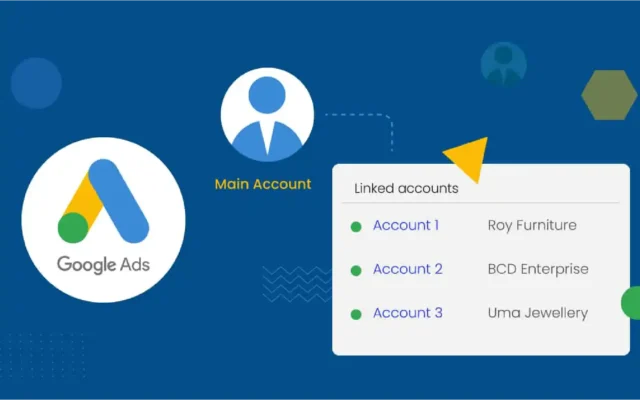
MCC (My Client Center) is a Google-approved tool that allows advertisers to manage several Google Ads accounts under one umbrella. Instead of logging in and out of each account, MCC streamlines management through one dashboard.
Benefits of MCC:
- Centralized control
- No need for multiple email logins
- Safe and policy-compliant
- Ideal for agencies and large-scale advertisers
If you manage accounts for clients, or run various brands, an MCC account is a must-have.
2. Personal Accounts vs. MCC: What’s the Difference?
| Feature | Personal Accounts | MCC (Manager Account) |
| Login | Separate per account | Single login for all accounts |
| Risk | Higher | Lower if properly used |
| Tracking & Reporting | Fragmented | Centralized |
| Suitability | Small campaigns | Agencies, businesses, resellers |
Using multiple personal Google Ads accounts without clear separation or proper setup increases the risk of flagging and suspension.
Step-by-Step: How to Properly Create & Manage Multiple Accounts
1. How to Create a Google Ads Manager Account
- Go to ads.google.com/home/tools/manager-accounts/
- Sign up using your Google account
- Complete business verification
- Start adding sub-accounts
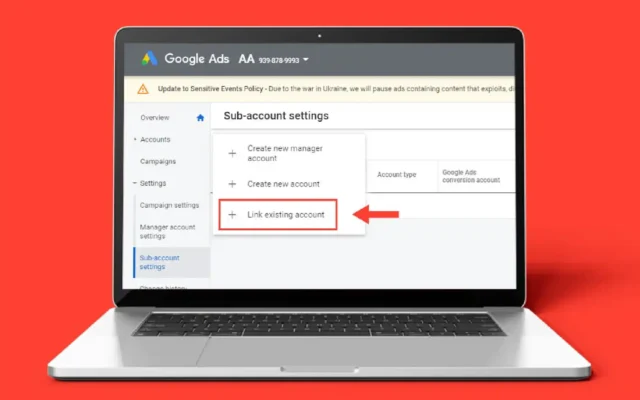
2. Linking Sub-Accounts into MCC
Each Google Ads account has a Customer ID (CID). Here’s how to connect them:
- Inside MCC, select “Link Existing Account”
- Enter the 10-digit CID
- The sub-account owner must approve the request
- Once approved, you’ll have access via your MCC dashboard
3. Tools for Managing Multiple Google Ads Accounts
- Google Ads Editor – Bulk edit campaigns offline
- Google Tag Manager – Manage tags and pixels easily across accounts
- Google Scripts – Automate reporting, alerts, and actions
These tools help you handle multiple accounts faster and more efficiently.
Avoiding Suspensions: Stay Compliant with Google Ads Policies
Running multiple Google Ads accounts always comes with risks if done incorrectly. Here’s how to stay safe:
1. Common Triggers for Suspension:
- Using the same IP or device for multiple accounts
- Repeated policy violations across accounts
- Overlapping billing or contact info
- Creating accounts after suspension without proper remediation
2. Tips to Protect Your Accounts:
- Use separate billing profiles
- Use unique IPs, browsers (Chrome Profiles), or VPS for each account
- Never recycle suspended account info (emails, credit cards, etc.)
- Verify your business and website in each account
Taking these precautions drastically reduces the chances of account termination.
When Should You Consider Hiring an Agency?
Managing multiple Google Ads accounts effectively requires experience, time, and infrastructure. For many businesses, hiring a professional agency is a more efficient and secure option.
Why work with an agency like LLD Agency?
- Access to aged, verified, and invoice-ready Google Ads accounts
- Support for diverse verticals and ad types
- Strategic account structure and budget allocation
- Secure IP usage and compliance setup
- Fast setup, ongoing support, and flexibility
With a reliable partner, you get peace of mind — and performance you can count on.
Frequently Asked Questions (FAQs)
Q: Can I create multiple Google Ads accounts with one email?
A: Yes, using a Google Ads Manager Account (MCC) allows you to manage multiple accounts under a single login.
Q: Does using MCC help avoid suspensions?
A: Yes, if used correctly and all accounts follow Google’s policies.
Q: Will Google see me as spam if I run multiple accounts?
A: No, as long as each account serves a distinct purpose and complies with policy.
Q: How many Google Ads accounts should I use?
A: That depends on your campaign strategy, client count, and budget. MCC can scale as your needs grow.
Final Thoughts
Using multiple Google Ads accounts can be a game-changer — but only if you manage them the right way. From setting up an MCC to implementing account security protocols and automation tools, following best practices is non-negotiable.
And if you prefer to focus on running your business instead of managing ad accounts?
Let LLD Agency handle it for you.
We provide ready-to-use Google Ads accounts, strategic support, and worry-free setup — tailored to your goals.
Ready to take your advertising to the next level?




