
If you’re running Google Ads to grow your business, setting up your payment profile in Google Ads correctly is critical. Whether you’re a business owner, digital marketer, or freelancer, ensuring accurate billing information is essential to avoid interruptions and keep your campaigns performing smoothly.
In this guide, we’ll walk you through everything you need to know about your Google Ads payment profile: how to create one, how to manage it, common issues, and how to optimize it for your ad operations. If you’re buying accounts or managing multiple clients, a clean payment setup is not optional—it’s vital.
What Is a Payment Profile in Google Ads?
Understanding the Payment Profile and Its Role
A payment profile in Google Ads is the section where you store and manage your billing details, including payment methods (credit cards, bank accounts, PayPal) and company information. It is used across all Google services, not just Ads, via the Google Payments Center.
Payment Profile vs. Billing Account
Many advertisers confuse the billing account with the payment profile. Simply put:
- The billing account handles your invoices and transaction history.
- The payment profile stores your actual payment instruments and tax/business data.
Both are linked, but the payment profile is the core element that ensures money moves correctly.
Why Payment Profile Setup Is Important
A misconfigured or outdated Google Ads payment profile can lead to rejected payments, paused campaigns, or even suspended accounts. Many users search phrases like “fix Google Ads payment method issue” or “update Google Ads billing info” when facing such problems.
Having a correctly set-up and actively monitored payment profile ensures:
- Timely ad delivery
- Compliance with Google’s billing policies
- Better financial tracking and reporting
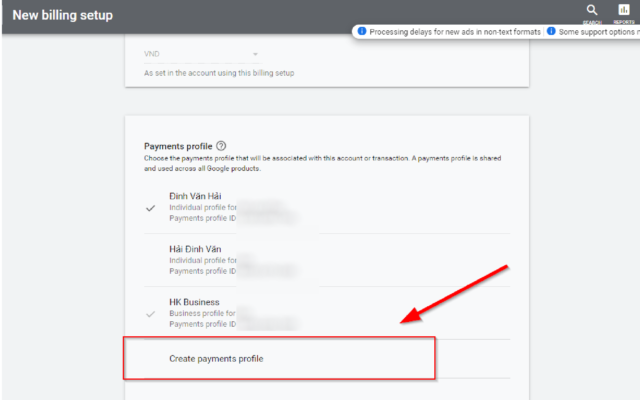
How to Create a Payment Profile in Google Ads
Prerequisites to Create a Payment Profile
To set up a new payment profile, you’ll need:
- A Google Ads account
- Legal business name and address
- Tax ID (if applicable)
- Valid payment method (credit/debit card, bank transfer, or PayPal)
Step-by-Step Instructions
- Go to your Google Ads account and click the Tools & Settings icon.
- Under Billing, click Settings.
- If no profile exists, Google will prompt you to create one.
- Fill out the business info: legal name, billing address, tax info.
- Add a primary payment method.
- Set payment preferences: Automatic vs. Manual.
- Save and verify.
Congratulations, your Google Ads payment profile is now active!
Payment & Tax Information Tips
- Ensure your address matches the card issuer or bank records.
- For businesses, enter your VAT or company tax ID to receive compliant invoices.
- Use official company email for billing communication.
How to Edit and Manage Your Google Ads Payment Profile
Update Your Payment Details
Need to update Google Ads billing info? Follow these steps:
- Navigate to Payments > Payment Settings.
- Click on your current payment profile.
- Select Edit next to the field you want to update (e.g., credit card, billing address).
- Save changes. Google may require re-verification.
Change Company Info or Tax ID
- In the Payments Center, locate the Profile Settings section.
- Update your legal entity name, business type, and tax information.
- Review changes and confirm with authorized access.
Who Can Edit the Payment Profile?
Only users with admin-level access or designated financial roles can make changes. This prevents unauthorized alterations and protects your account integrity.
Common Payment Profile Issues and Fixes
Payment Method Declined
- Double-check card validity, available funds, and billing address.
- Contact your bank to ensure the transaction isn’t blocked.
Can’t Add New Payment Method
- Make sure you’re logged in as an admin.
- Verify that the country of the card matches your account region.
- Try a different browser or incognito mode.
Payment Profile Suspended
Your payment profile may be suspended due to fraud detection, policy violations, or chargebacks. To resolve:
- Contact Google support.
- Submit verification documents (ID, bank statement).
- Resolve any past-due invoices.
If you’re frequently running into billing suspensions, consider purchasing ready-to-use, verified Google Ads accounts with clean payment profiles from a trusted provider.
Best Practices to Optimize Your Google Ads Payment Profile
Use Multiple Profiles for Budget Control
For agencies or businesses managing multiple brands, use separate payment profiles to compartmentalize spend and improve reporting clarity.
Assign Proper Roles & Access
Ensure only authorized personnel (accountants, managers) can manage the payment profile. Review access regularly.
Conduct Periodic Payment Reviews
Set a monthly reminder to review your billing information. Update expired cards and verify invoice accuracy.
Frequently Asked Questions (FAQs)
Can I use one payment profile for multiple Google Ads accounts? Yes. A single payment profile can be shared across several Ads accounts via a manager (MCC) account.
Can I transfer a payment profile to another user? No. Google does not currently allow ownership transfers of payment profiles. You must create a new one.
Why can’t I edit certain fields in my payment profile? Some fields, like tax ID or business name, become locked once submitted. Contact Google Support to request changes.
Does my payment profile affect campaign performance? Indirectly, yes. Failed payments can pause your campaigns, hurting performance. Clean, updated profiles ensure uninterrupted delivery.
Final Thoughts
A well-maintained Google Ads payment profile is essential for smooth advertising operations. From preventing billing disruptions to improving spend control, it serves as the financial backbone of your campaigns.
Whether you’re new to Google Ads or managing accounts at scale, understanding how to configure and maintain your payment profile is a must-have skill.
If you’re looking for reliable Google Ads accounts with verified payment profiles, our agency specializes in providing pre-configured accounts tailored for performance and compliance. With years of experience, diverse account sources, and strong support, we ensure your advertising journey starts on the right foot.
Ready to scale your ads with confidence? Contact us today for verified Google Ads accounts with optimized billing setups.




