
Running a Google Ads campaign is one of the most effective ways to reach customers online. However, when your account suddenly gets suspended or disabled, it can disrupt your entire marketing strategy. Reactivating your Google Ads account swiftly is critical to prevent lost opportunities and maintain your business momentum.
In this article, we’ll guide you through everything you need to know about how to reactivate Google Ads account successfully. From understanding suspension reasons to practical steps and expert tips, you’ll find a complete roadmap right here.
Why Was Your Google Ads Account Deactivated?
Common Reasons for Account Suspension
Google maintains strict advertising policies to ensure a safe and trustworthy experience for users. Common reasons your account might be suspended include:
- Violation of Google’s Advertising Policies
- Suspicious payment activity
- Circumventing systems (e.g., cloaking, multiple account setups)
- Misrepresentation of your product or service
- Malware issues on your website
Understanding these causes is crucial when trying to reactivate Google Ads account.
Frequent Policy Violations (with Examples)
- Misleading Claims: Promoting unrealistic weight loss products.
- Restricted Products: Advertising alcohol without proper certification.
- Data Collection Violations: Not disclosing how you collect user data.
Understanding Google’s Suspension Notice
When Google suspends an account, they usually send an email detailing the reason. Carefully review this notice. It often contains:
- Policy violated
- Specific campaigns affected
- Steps you can take next
Recognizing the details in this notification is key to creating an effective appeal.
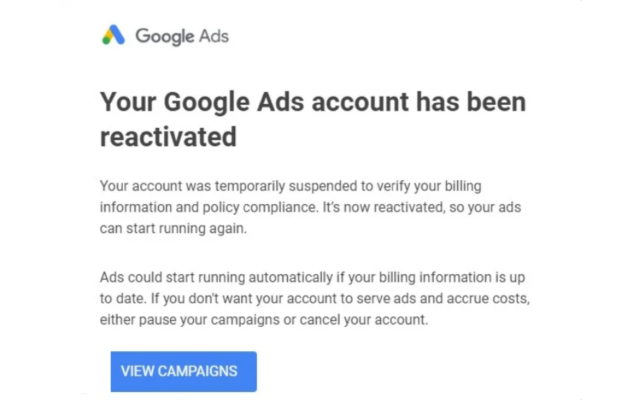
Conditions for Reactivating Your Google Ads Account
When Can You Request a Review?
You can submit an appeal to reactivate Google Ads account if:
- You have corrected the policy violation.
- You genuinely believe the suspension was an error.
- Your account is eligible under Google’s reinstatement policies.
When Reactivation May Not Be Possible
Unfortunately, some suspensions are permanent. For example:
- Repeated violations after warnings
- Engaging in fraudulent behavior
- Creating new accounts to bypass prior suspensions
In these cases, alternative strategies might be necessary.
Step-by-Step: How to Reactivate Google Ads Account
Step 1: Check the Suspension Reason in Google Ads
Login to your Google Ads account. A warning banner should explain why your account was disabled. This is your starting point for all corrective actions.
Step 2: Address and Fix the Violation
Take immediate steps to rectify the issue:
- Edit or remove non-compliant ads
- Update your landing pages
- Verify payment information
Google expects clear and genuine corrections before considering reinstatement.
Step 3: Prepare All Necessary Documents and Information
Having supporting documents ready (like certificates, business licenses, policy compliance proofs) will strengthen your case when you submit the appeal.
Step 4: Submit the Google Ads Account Appeal Form
Go to the “Contact Us” section in your Google Ads dashboard. Select “Appeal” and fill out the form. Be honest, thorough, and professional in your explanation.
Important: This is your best chance to convince Google. Make sure your appeal highlights:
- What went wrong
- How you have fixed it
- Your commitment to policy compliance
Step 5: Monitor the Appeal Progress
After submitting the appeal, regularly check your email and Google Ads dashboard. Google usually responds within 3-5 business days.
Patience is vital here. Constantly submitting multiple appeals without waiting may slow down the review process.
Tips to Maximize Your Chance to Reactivate Google Ads Account
Key Things to Remember When Appealing
- Be Specific: Generic excuses won’t work.
- Be Professional: Use polite, clear language.
- Show Proof: Attach relevant evidence when applicable.
Common Mistakes to Avoid
- Submitting an appeal without fixing the root cause.
- Copy-pasting generic appeal templates.
- Being confrontational or blaming Google.
How to Write an Effective Appeal Letter
- Introduction: State who you are and why you’re appealing.
- Body: Explain the issue, actions taken, and commitment to policy adherence.
- Conclusion: Politely request reinstatement and express willingness to comply fully.
Including these elements can dramatically improve your chances to reactivate Google Ads account.

What to Do if Reactivation Fails?
Creating a New Google Ads Account (Properly)
If reactivation isn’t possible, you may set up a new account, but only if you genuinely meet Google’s requirements. Avoid using the same information or payment methods as the suspended account.
Following all of Google’s policies from the beginning ensures your new account remains active.
Using an Agency’s Advertising Services
Sometimes, partnering with an experienced Google Ads agency can be the fastest route back to advertising.
At LLD Agency, we specialize in providing reliable, fully compliant Google Ads accounts to businesses worldwide. Our accounts come with flexible payment options, proactive customer support, and strong advertising potential. If you’re struggling to reactivate Google Ads account or need immediate access to new accounts, we are here to help you resume your growth without delay.

FAQ — Frequently Asked Questions
Can I reactivate Google Ads account multiple times?
Yes, but only if each appeal is justified with real corrections. Multiple unsuccessful appeals without genuine improvements can lead to permanent suspension.
How long does Google take to review an account appeal?
Typically between 3-5 business days, though complex cases may take longer.
Can I recover my account if it was suspended due to payment issues?
Yes. Rectify the payment problem (e.g., updating billing info or clearing dues), then submit an appeal.
Should I hire an external service to help reactivate my Google Ads account?
If you lack experience or urgent needs, working with a reputable agency can save time and ensure compliance.
Conclusion
Reactivating a Google Ads account can seem daunting, but with the right approach, it’s often very achievable. By understanding the causes, thoroughly fixing any issues, and submitting a well-crafted appeal, you can successfully reactivate Google Ads account and get back to reaching your audience.
Don’t let a suspension permanently derail your marketing efforts. Take swift action, stay compliant, and if needed, seek assistance from trusted Google Ads partners like [Your Agency Name]. Our team is ready to support your business goals every step of the way.
Need a fully verified Google Ads account or professional assistance? Contact LLD Agency today and take your advertising to the next level!




